What’s Cookin’ in TamperedChef’s Kitchen? A Peek Into the Campaign’s Latest Activity
A Technical Analysis of Tampered Chef and AceLauncher.exe

Tampered Chef
A malware campaign known as TamperedChef/EvilAI started to be tracked in June of this year but information such as the timestamp on the compiled executables indicates that preparation for this campaign could have started as early as March. The AceLauncher malware can be attributed to TamperedChef/EvilAI with high confidence because of similar TTPs with previous TamperedChef activity. The malware campaign typically uses themes such as enhanced browser productivity tools (the sample we’ll be viewing today), AI tools, PDF Readers, and Recipe applications (We’ll see artifacts of a recipe app in today’s sample as well). The use of AI to quickly put together legitimate-looking websites, the tools downloaded providing their claimed utility, and code signing their applications make these malware campaigns particularly effective. The observed end goal of these campaigns is to exfiltrate browser data but other activity such as deploying a JavaScript backdoor have also been reported. Other motivations behind the campaign could include gaining initial access to sell for ransomware staging and opportunistic espionage.
Alleged TamperChef/EvilAI Campaigns
- All Manuals Reader
- Master Chess
- Manual Reader Pro
- Manual Finder
- JustAskJacky
- Total User Manual
- Any Product Manual
- App Suite
- One Start
- PDF Editor
- Recipe Lister
AceLauncher
Using Any.Run we can navigate to AceLauncher[.]com and view the landing page along with some other pages on the website.

In short, AceLauncher is a claiming to be a browser productivity tool. They will download a chromium based browser, give you a toolbar that isn’t very helpful, and all they ask for in exchange is your browser credentials! What a great deal!
I’ve also included their “Features” page. While I don’t agree with their actions I think we can all agree that the website is put together very well and can absolutely be convincing to someone that is less experienced with computers.
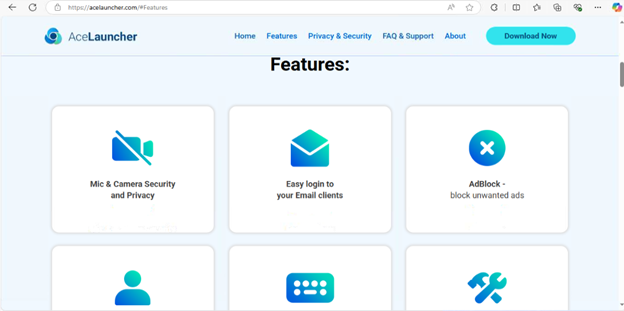
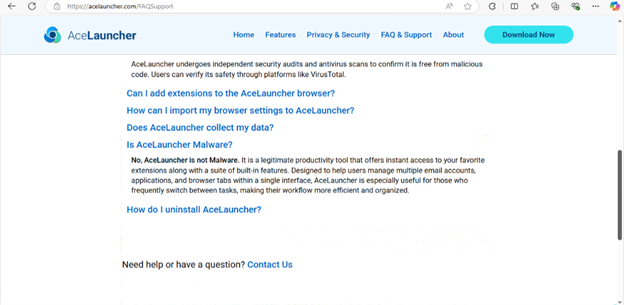
But hey, they mention that they’re an authorized distributor of Norton and McAfee antivirus software and under their FAQ section they state they’re NOT malware. So it must be safe!
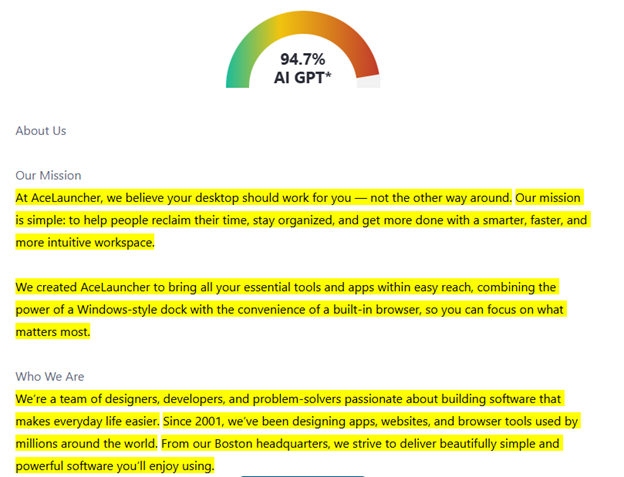
I was highly suspicious that this website was quickly put together with the use of AI whether that be vibe coding the website and/or using an LLM to generate all of the text on the website. I copied two paragraphs of text from their website and input them into zerogpt. zerogpt returned a 94.7% chance it was written using an LLM. That confirms that suspicion and makes it undeniable that threat actors are leveraging LLMs to stand up infrastructure faster and create more convincing landing pages.
If you’re curious what the “utility” of the product is once it’s downloaded here’s a screenshot. It’s a chromium browser with a dock on the top that includes shortcuts to websites. I’m sure the “shortcuts” contain redirects to many other sites owned by the threat actor as adware as well.
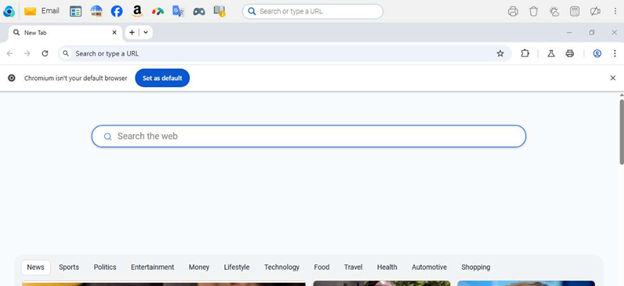
Now, let’s get into the analysis!
AceLauncher.exe (Installer) - First Stage
The first file we’ll analyze is the installer. Admittedly, I was not able to make it very far in the analysis of this sample. The majority of the information gathered on this campaign comes from the second sample we’ll analyze later in the post. If you enjoy malware analysis feel free to download the sample and let me know what you find!
After downloading the installer from the main landing page of the website, we’re greeted with an error message. This error message spawns because the certificate the malware was signed with was revoked. If you’re interested in learning more about how software certificates can be abused, check out Cert Central.
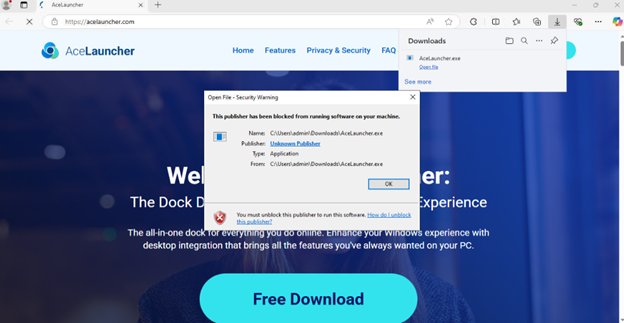
I was not able to find a workaround to download the file because the certificate was revoked, but I was able to pull a sample from Malware Bazaar. That is the sample we’ll be analyzing moving forward. It’s worth noting that if the signature was still valid a victim would be able to download and execute the binary from the website.
Viewing the signature details, we can see that the executable was signed by Sunstream Labs (Capital Intellect Inc.).
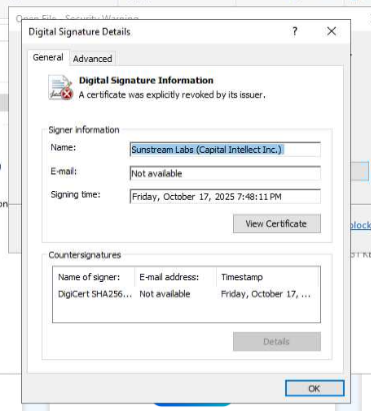
Using DIE (Detect It Easy) we can see that the installer is written in Delphi. 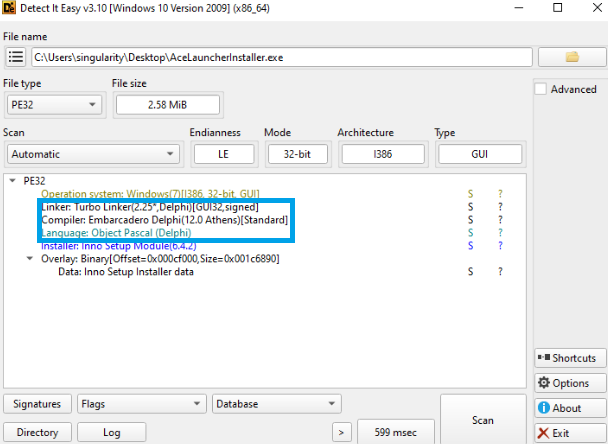
Executing the installer
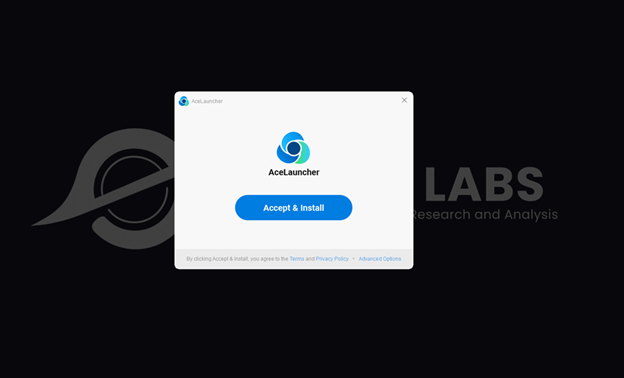
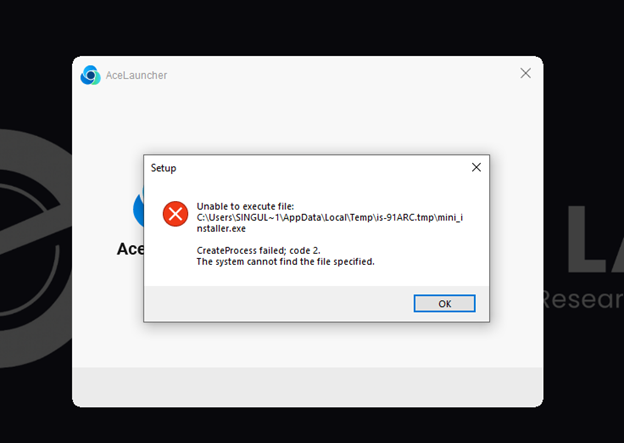
Although there were errors while working through the installation of the malware as shown below, the malware still successfully installed, and those errors could be used to extract IOCs from the sample.
The first error indicated a CreateProcess failure in the Temp directory. This mini_installer.exe file will be included as an IOC.
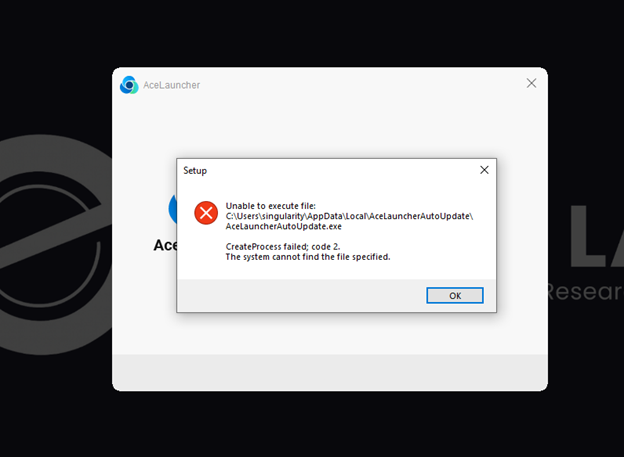
The second error is a bit more telling and indicates the existence of an autoupdater for the executable. This will also be logged as an IOC.
After installation two .lnk files were dropped on the desktop.
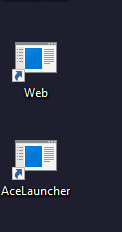
AceLauncher.lnk properties:
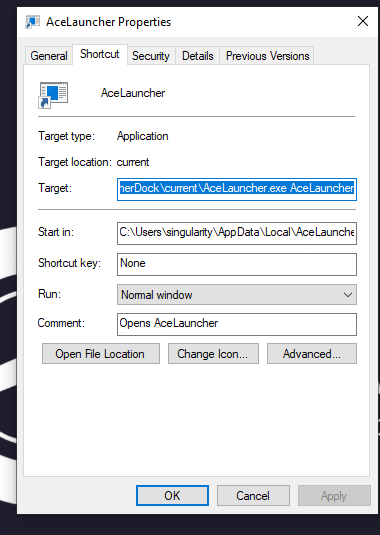
Target: C:\Users\{username}\AppData\Local\AceLauncherDock\current\AceLauncher.exe AceLauncher
Web.lnk properties:
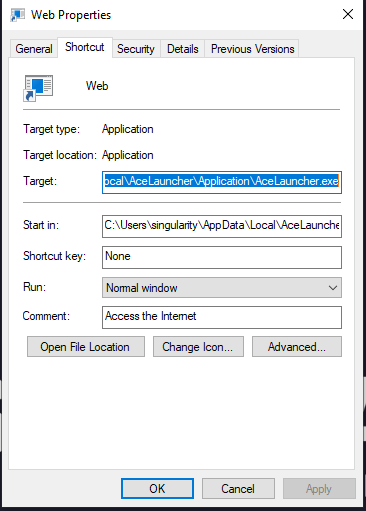
Target: C:\Users\{username}\AppData\Local\AceLauncher\Application\AceLauncher.exe
Following the crumbs..
If we follow the path referenced in the targets of the two .lnk files dropped onto the desktop we come across something very interesting. Within the \AppData\Local\AceLauncher directory we can see a “User Data” directory. The User Data directory contains a Default folder, a “fresh test” file, and a “Local State” file. Navigating to the Default folder we can begin to figure out the objective of this malware campaign.
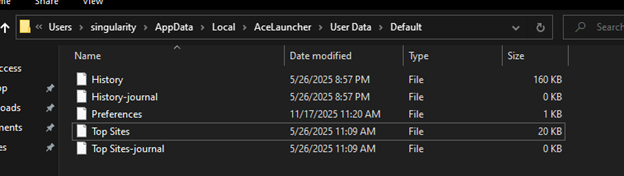
All of the files listed are in a SQLite format. The “History” file contains all of the victims browser history, downloaded files, and much more. The names of the other files explain their purpose.
That was as far as I could get with my current skill set. As I stated before, if you are up to the challenge and can gain a better understanding of what the first file does please reach out! I’d love to update this post with more information and will obviously credit your findings!
Onto the second file!
AceLauncher.exe - Second Stage
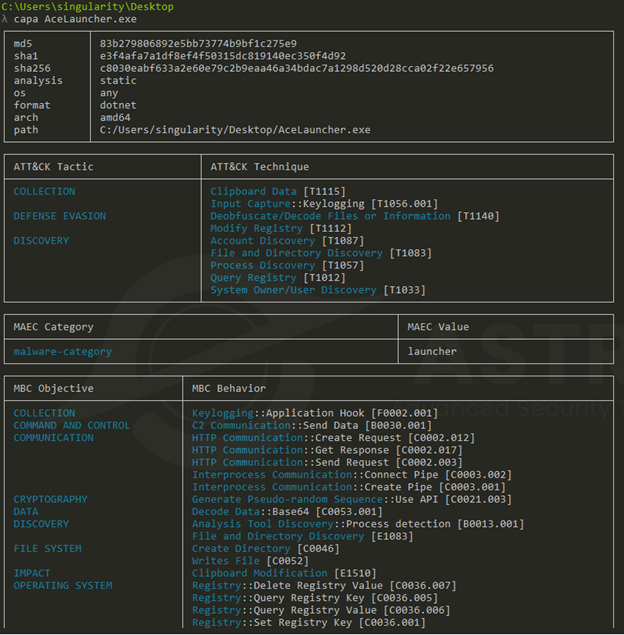
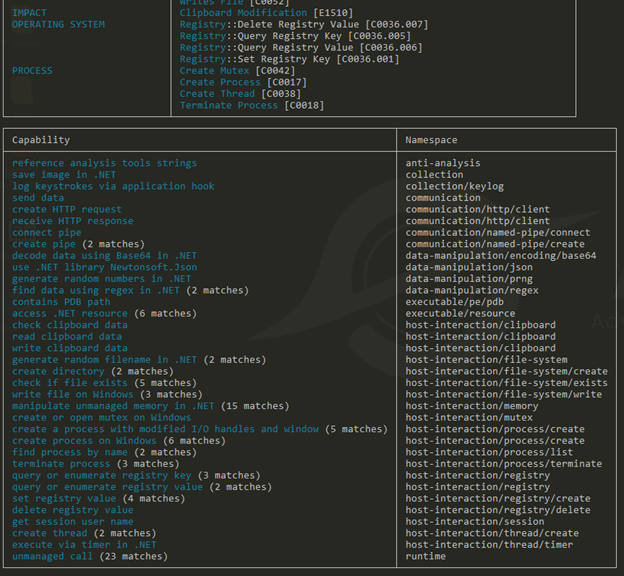
Things get more interesting with this sample. Since the executable is a .NET binary we can throw it into DnSpy and gain a much better understanding of what’s going on internally. Before we do that though, I decided to use one of my favorite tools for quick malware triage, capa.
Capa
Viewing the capa output, we’re able to see some really useful information. Some of the tactics to highlight are the changes to the operating systems registry which can indicate the malware trying to achieve persistence. We also see Keylogging, C2 Communication, and interactions with the clipboard data.
Floss - Strings of Interest
Using the tool Floss we’re able to pull strings out of the binary. This can be helpful to find things like domain names (C2), processes it may interact with, etc.
Here we’re able to view two domains. As the name suggests, let’s assume the malware reaches out to these domains periodically to check for updates. 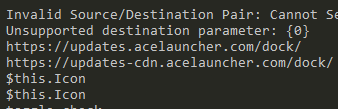
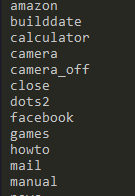
Hmmm.. now this is interesting. The information that we found earlier in the analysis of the first sample pointed to it being infostealer, but now there’s mentions of “camera” and “camera_off”. If you saw in the “Features” screenshot on the website they list “Mic & Camera Security and Privacy” as a feature. Playing devil’s advocate this could be used because it’s a chromium app and chromium may require this for certain applications, but it does raise the suspicion of this sample having the potential to be a RAT.
There are also a few mentions of Chrome Extensions in the sample as well. I know very little about Chrome Extensions and how they can operate with malware, so I’m including this as additional information for anyone who may have a better understanding.

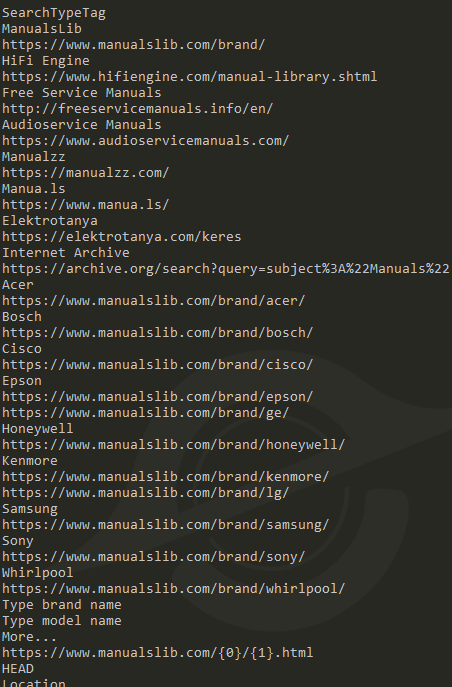
If at any point you were wondering why I attributed this sample to TamperedChef, now is the time the pieces might start coming together. Further into the strings discovered were references to many manuals. TamperedChef has been observed using malware campaigns surrounding the use of manuals such as “All Manuals Reader”, “Manual Reader Pro”, and “Manual Finder”. These may be unused artifacts in the executable that was used in previous campaigns.
Static Analysis - Dnspy
Since this is a .NET binary we can throw it in Dnspy and view the reconstructed source code. Navigating to the entry point, we can see the following:
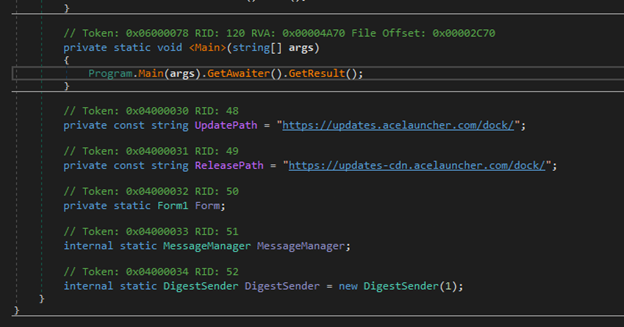
There are a couple of interesting lines of code worth mentioning here. We see the domains captured in the Floss output listed as the UpdatePath and the ReleasePath. Below that we also see DigestSender. DigestSender is typically a class responsible for sending digest emails. Things like summaries of events, logs, notifications, etc. This may aggregate data on the host and send it in daily or weekly digest.
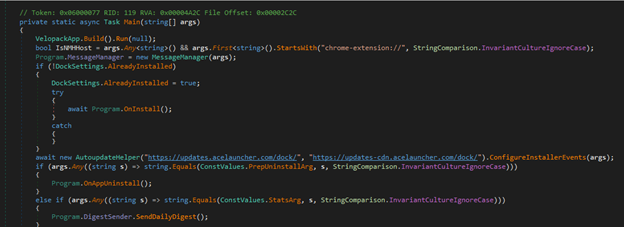
This next block of code also has some very interesting sections. First it will check if the program was launched as a Chrome Extension and then initializes a new MessageManager. The MessageManager receives command line arguments like commands or remote tasks. The malware then moves onto the installation logic. If the malware hasn’t been installed yet it will run the OnInstall() method which likely drops files, installs the chrome extensions, etc. Following that we have the AutoUpdateHelper. This connects to AceLaunchers update servers. This could be used to download updated payloads, deliver exfiltrated data, and other C2 communications disguised as updates.
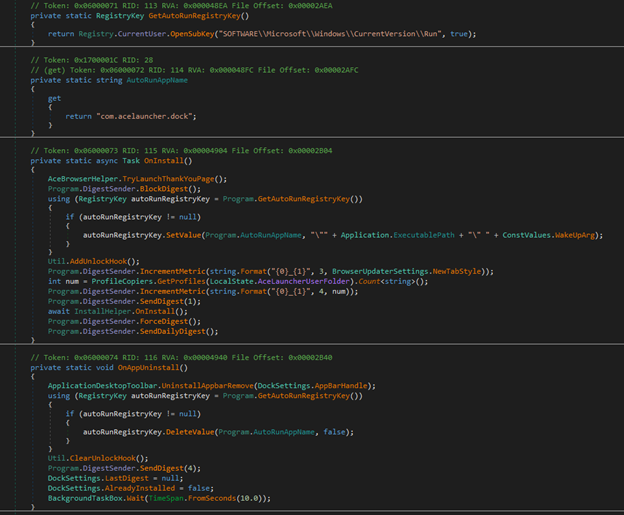
Moving onto the next block of suspicious code. The GetAutoRunRegistryKey() function opens the HKCU\Software\Microsoft\Windows\CurrentVersion\Run key which is standard Windows autorun persistence. The malware will later write its executable path here. The following function AutoRunAppName() is the registry value name used in the run key mentioned before. The registry key “com.acelauncher.dock” will be added as an IOC. Under the BlockDigest() method we can see the persistence being written to the registry. This will add itself to startup automatically and runs with a “WakeUp” argument. We can also see the DigestSender mentioned earlier being called here as well. The first call to the digest is an immediate exfiltration and the following DigestSender is a regularly occurring daily exfiltration.
While viewing the strings pulled from Floss I mentioned the “camera” and “camera_off” strings that raised further suspicion of malicius built in modules. Viewing the namespaces of the binary we can see “CameraSettings” along with “ShellApi”. I viewed the code within those spaces and didn’t see anything inherently malicious, but I do find these built-in utilities to be very suspicous. They could be benign or they could be sitting there waiting to be activated at a later date with a further update pulled from the C2.
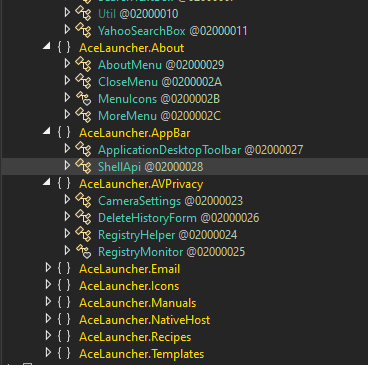
Wait… did you see what I saw? Was that a mention to manuals AND recipes in the other namespaces?? We now have an even stronger case for attribution to the campaign TamperedChef. While doing some research I found a sample of AceLauncher ran on Any.Run and what do you know. They’re using their AceLauncher branding/domain to also push one of their older recipe themed applications. I thought I would include this as a cool easter egg to solidify the attribution to TamperedChef.

This analysis wasn’t as thorough or technical as I would have liked it to be, but that’s a skill issue and we’ll get there eventually. If you made it this far thank you for reading and I hope you found the content helpful or interesting!
Indicators of Compromise
- Sha256: c8030eabf633a2e60e79c2b9eaa46a34bdac7a1298d520d28cca02f22e657956
- https[:]//updates.acelauncher[.]com/dock/
- https[:]//updates-cdn.acelauncher[.]com/dock/
- chrome-extension[:]//ecfcoejjilmbbeleepnmfhnmoeclakjh/
- chrome-extension[:]//oobelncjpkioeencmnochfgbjlilmlcfg/
- chrome-extension[:]//mljdfgjklelfkcofndhmflkkilmlfgna/
- \is-91ARC.tmp\mini_installer.exe
- \AceLauncherAutoUpdate\AcelauncherAutoUpdate.exe
- Registry Key com.acelauncher.dock